String Handling

ICSE Class 10 Computer Applications · Sumita Arora Computer Applications · 28 solved questions

Exercise
1Objective Type Questions

A String object cannot be modified after it is created. (T/F)

Show SolutionHide Solution↓

True

Reason — The string objects of Java are immutable i.e., once created, they cannot be changed. If any change occurs in a string object, then original string remains unchanged and a new string is created with the changed string.

2Objective Type Questions

The length of a String object s1 can be obtained using the expression s1 length. (T/F)

Show SolutionHide Solution↓

False

Reason — The length of a String object s1 can be obtained using the expression s1.length() as length() method returns the length of the String object.

3Objective Type Questions

Which of the following methods belong to the String class ?

Show SolutionHide Solution↓

All of these

Reason — All of the given methods belong to the String class.

4Objective Type Questions

Given the code

String s1 = "yes" ;
String s2 = "yes" ;
String s3 = new String(s1) ;

Which of the following would equate to False ?

Show SolutionHide Solution↓

s3 == s1

Reason — Each of the four comparisons are explained below:

  1. The first comparison uses the == operator to compare s1 and s2. == operator checks for reference equality, i.e., whether both variables refer to the same object in memory. Since s1 and s2 have the same value and were created using the same string literal, they will refer to the same object in memory. Therefore, this comparison returns true.
  2. The second comparison uses the == operator to compare s3 and s1. Since s3 was created using the new keyword and is therefore a different object in memory than s1, this comparison returns false.
  3. The third comparison uses the equals method to compare s1 and s2. This method checks for value equality, i.e., whether both objects have the same value regardless of their memory location. Since s1 and s2 have the same value, this comparison returns true.
  4. The fourth comparison uses the equals method to compare s3 and s1. This method also checks for value equality, so it returns true because s3 and s1 have the same value, even though they are different objects in memory.
5Objective Type Questions

Suppose that s1 and s2 are two strings. Which of the statements or expressions are incorrect ?

Show SolutionHide Solution↓

String = s1 - s2;

Reason — - operator cannot be used with String objects, hence the statement String s3 = s1 - s2; is incorrect.

6Objective Type Questions

Given the code :

String s = new String("abc");

Which of the following calls are invalid ?

Show SolutionHide Solution↓

s.setCharAt(1, 'A')

Reason — setCharAt() is a method of StringBuffer class. It cannot be used with a String object, which is immutable.

7Objective Type Questions

Which of these class is superclass of String and StringBuffer class?

Show SolutionHide Solution↓

java.lang

Reason — java.lang is the superclass of String and StringBuffer class.

8Objective Type Questions

Which of these methods of class String is used to obtain length of String object?

Show SolutionHide Solution↓

length( )

Reason — length( ) returns the length of a given String object.

9Objective Type Questions

Which of these methods of class String is used to extract a single character from a String object?

Show SolutionHide Solution↓

charAt( )

Reason — charAt( ) returns the character at the given index in a String object.

10Objective Type Questions

Which of these constructors is used to create an empty String object?

Show SolutionHide Solution↓

String( )

Reason — String( ) constructor is used to create an empty String object as it does not specify any String value.

11Objective Type Questions

Which of these is an incorrect statement?

Show SolutionHide Solution↓

String objects are actually arrays of characters.

Reason — String are classes in Java. Array of characters is one of the data members of String class.

1Assignment Questions

What are String and StringBuffer classes of Java?

Show SolutionHide Solution↓

In Java, we can work with characters by using String and StringBuffer class.

String class — The instances of String class can hold unchanging string, which once initialized cannot be modified. For example,

String s1 = new String("Hello");

StringBuffer class — The instances of StringBuffer class can hold mutable strings, that can be changed or modified. For example,

StringBuffer sb1 = new StringBuffer("Hello");

2Assignment Questions

How are Strings different from StringBuffers ?

Show SolutionHide Solution↓

The string objects of Java are immutable i.e., once created, they cannot be changed. If any change occurs in a string object, then original string remains unchanged and a new string is created with the changed string.

On the other hand, StringBuffer objects are mutable. Thus, these objects can be manipulated and modified as desired.

3Assignment Questions

How can you convert a numeric value enclosed in a string format ?

Show SolutionHide Solution↓

We can convert a numeric value enclosed in a string format into a numeric value by using valueOf() method.

For example, the given statement will return the numeric value of the String argument "15".

int num = Integer.valueOf("15");

4Assignment Questions

Write the return type of the following library functions :

Show SolutionHide Solution↓
  1. boolean
  2. String
5Assignment Questions

State the data type and values of a and b after the following segment is executed.

String s1 = "Computer", s2 = "Applications"; 
a = (s1.compareTo(s2));
b = (s1.equals(s2));
Show SolutionHide Solution↓

Data type of a is int and value is 2. Data type of b is boolean and value is false.

compareTo() method compares two strings lexicographically and returns the difference between the ASCII values of the first differing characters in the strings. Thus, a will be of int data type and store the value 2 as the difference between ASCII values of 'A' and 'C' is 2.

equals() method compares two String objects and returns true if the strings are same, else it returns false. Thus, b will be of boolean data type and result in false as both the strings are not equal.

6Assignment Questions

What do the following functions return for :

String x = "hello"; 
String y = "world";

(i) System.out.println(x + y);

(ii) System.out.println(x.length( ));

(iii) System.out.println(x.charAt(3));

(iv) System.out.println(x.equals(y));

Show SolutionHide Solution↓

(i) System.out.println(x + y);

helloworld

+ operator concatenates String objects x and y.

(ii) System.out.println(x.length( ));

5

length() returns the length of the String object. Since x has 5 characters, the length of the string is 5.

(iii) System.out.println(x.charAt(3));

l

chatAt() returns the character at the given index. Index starts from 0 and continues till length - 1. Thus, the character at index 3 is l.

(iv) System.out.println(x.equals(y));

false

equals() method checks for value equality, i.e., whether both objects have the same value regardless of their memory location. As values of x and y are not the same, so the method returns false.

7Assignment Questions

What will the following code output ?

String s = "malayalam" ;
System.out.println(s.indexOf('m')); 
System.out.println(s.lastIndexOf('m'));
Show SolutionHide Solution↓
0
8

indexOf() returns the index of the first occurrence of the specified character within the current String object. The first occurrence of 'm' is at index 0, thus 0 is printed first.

lastIndexOf() returns the index of the last occurrence of the specified character within the String object. The last occurrence of 'm' is at index 8, thus 8 is printed next.

8Assignment Questions

If:

String x = "Computer";  
String y = "Applications";

What do the following functions return?

(i) System.out.println(x.substring(1,5));

(ii) System.out.println(x.indexOf(x.charAt(4)));

(iii) System.out.println(y + x.substring(5));

(iv) System.out.println(x.equals(y));

Show SolutionHide Solution↓

(i) System.out.println(x.substring(1,5));

ompu

x.substring(1,5) will return a substring of x starting at index 1 till index 4 (i.e. 5 - 1 = 4).

(ii) System.out.println(x.indexOf(x.charAt(4)));

4

charAt() method returns the character at a given index in a String. Thus, x.charAt(4) will return the character at the 4th index i.e., u. indexOf() method returns the index of the first occurrence of a given character in a string. Thus, it returns the index of u, which is 4.

(iii) System.out.println(y + x.substring(5));

Applicationster

x.substring(5) will return the substring of x starting at index 5 till the end of the string. It is "ter". This is added to the end of string y and printed to the console as output.

(iv) System.out.println(x.equals(y));

false

equals() method checks for value equality, i.e., whether both objects have the same value regardless of their memory location. As the values of both x and y are different so it returns false.
9Assignment Questions

State the method that:

(i) converts a string to a primitive float data type.

(ii) determines if the specified character is an uppercase character.

Show SolutionHide Solution↓

(i) Float.parseFloat()

(ii) Character.isUpperCase()

10Assignment Questions

What will be the output of the following code snippet when combined with suitable declarations and run?

StringBuffer city = new StringBuffer("Madras"); 
StringBuffer string = new StringBuffer( ); 
string.append(new String(city)); 
string.insert(0, "Central "); 
String.out.println(string);
Show SolutionHide Solution↓

The given snippet will generate an error in the statement — String.out.println(string); as the correct statement for printing is — System.out.println(string);. After this correction is done, the output will be as follows:

Central Madras
StatementRemark
StringBuffer city = new StringBuffer("Madras");It creates a StringBuffer objectcity which stores "Madras".
StringBuffer string = new StringBuffer( );It creates an empty StringBuffer object string.
string.append(new String(city));It adds the value of city i.e. "Madras" at the end of the StringBuffer object string. string = " Madras".
string.insert(0, "Central ");It modifies StringBuffer object string and adds "Central" at 0 index or beginning. Now, string = "Central Madras".
System.out.println(string);It prints "Central Madras".
11Assignment Questions

What will be the output for the following program segment?

String s = new String ("abc");
System.out.println(s.toUpperCase( ));
Show SolutionHide Solution↓
ABC

String s stores "abc".

toUpperCase( ) method converts all of the characters in the String to upper case. Thus, "abc" is converted to "ABC" and printed on the output screen.

12Assignment Questions

Give the output of the following program :

class MainString
{
    public static void main(String[ ] args)
    {
        StringBuffer s = new StringBuffer("String"); 
        if((s.length( ) > 5) && 
        (s.append("Buffer").equals("X")))
        ;	// empty statement
        System.out.println(s);
    }
}
Show SolutionHide Solution↓
StringBuffer

The expression s.length( ) > 5 will result in true because the length of String s is 6 which is > 5.

In the expression s.append("Buffer".equals("X")), first the value of String s will be modified from String to StringBuffer and then it will be compared to "X". The result will be false as both the values are not equal.

Now, the condition of if statement can be solved as follows:

if((s.length( ) > 5) && (s.append("Buffer").equals("X")))
if(true && false)
if(false)

Thus, execution will move to the next statement following the if block — System.out.println(s); which will print StringBuffer on the screen.

13Assignment Questions

Write a program to do the following :

(a) To output the question "Who is the inventor of Java" ?

(b) To accept an answer.

(c) To print out "Good" and then stop, if the answer is correct.

(d) To output the message "try again", if the answer is wrong.

(e) To display the correct answer when the answer is wrong even at the third attempt and stop.

import java.util.Scanner;

public class KboatQuiz
{
    public static void main(String args[])
    {
        Scanner in = new Scanner(System.in);
        
        String q = "Who is the inventor of JAVA?";
        String a = "James Gosling";
        int i;
        
        System.out.println(q);
        
        for(i = 1; i <= 3; i++)
        {
            String ans = in.nextLine();
            ans.trim();
            if(ans.equalsIgnoreCase(a))
            {
                System.out.println("Good");
                break;
            }
            else if(i < 3)
            {
                System.out.println("Try Again");
            }
        }
        
        if(i == 4)
        {
            System.out.println("Correct Answer: " + a);
        }
    }
}
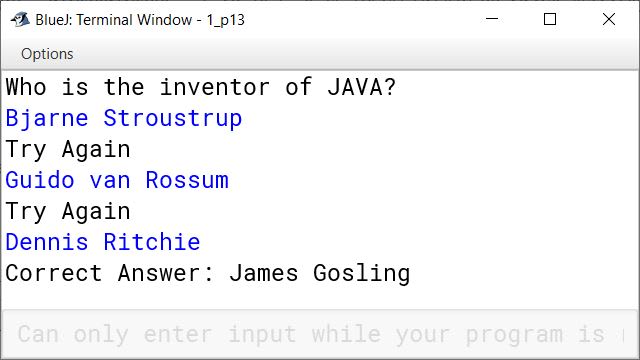
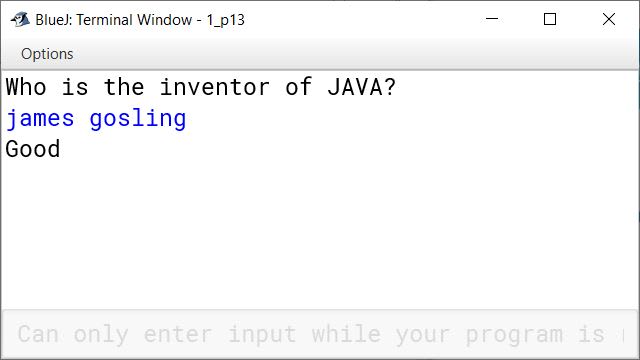
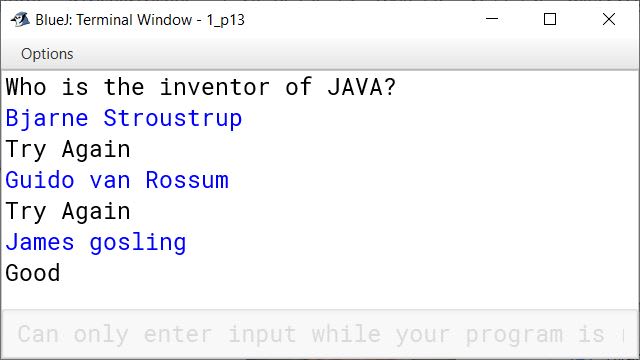
BlueJ output of KboatQuiz.java BlueJ output of KboatQuiz.java BlueJ output of KboatQuiz.java

Solution not available in the source paper.

14Assignment Questions

Write a program to extract a portion of a character string and print the extracted string. Assume that m characters are extracted, starting with the nth character.

import java.util.Scanner;

public class KboatExtractSubstring
{
    public static void main(String args[])  
    {
        Scanner in = new Scanner(System.in);
        System.out.print("Enter string : ");
        String s = in.nextLine();
        int len = s.length();
        System.out.print("Enter start index : ");
        int n = in.nextInt();
        
        if(n < 0 || n >= len)
        {
            System.out.println("Invalid index");
            System.exit(1);
        }
        
        System.out.print("Enter no. of characters to extract : ");
        int m = in.nextInt();
        
        int substrlen = n + m;
        if( m <= 0 || substrlen > len)
        {
            System.out.println("Invalid no. of characters");
            System.exit(1);
        }       

        String substr = s.substring(n, substrlen);
        System.out.println("Substring = " + substr); 
    }
}
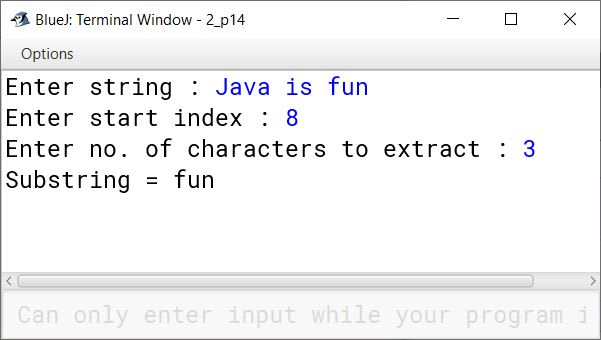
BlueJ output of KboatExtractSubstring.java

Solution not available in the source paper.

15Assignment Questions

Write a program, which will get text string and count all occurrences of a particular word.

import java.util.Scanner;

public class KboatWordFrequency
{
    public static void main(String args[]) {
        Scanner in = new Scanner(System.in);
        System.out.println("Enter a sentence:");
        String str = in.nextLine();
        System.out.println("Enter a word:");
        String ipWord = in.nextLine();
        str += " ";
        String word = "";
        int count = 0;
        int len = str.length();

        for (int i = 0; i < len; i++) {
            if (str.charAt(i) == ' ') {

                if (word.equalsIgnoreCase(ipWord))
                    count++ ;

                word = "";
            }
            else {
                word += str.charAt(i);
            }
        }
        
        if (count > 0) {
            System.out.println(ipWord + " is present " + count + " times.");
        }
        else {
            System.out.println(ipWord + " is not present in sentence.");
        }
        
    }
}
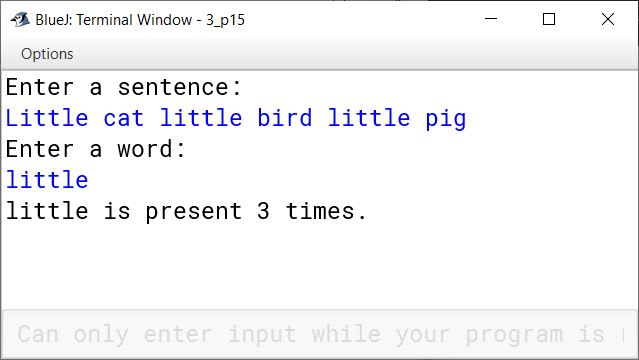
BlueJ output of KboatWordFrequency.java

Solution not available in the source paper.

16Assignment Questions

Write a program to accept a string. Convert the string to uppercase. Count and output the number of double letter sequences that exist in the string.

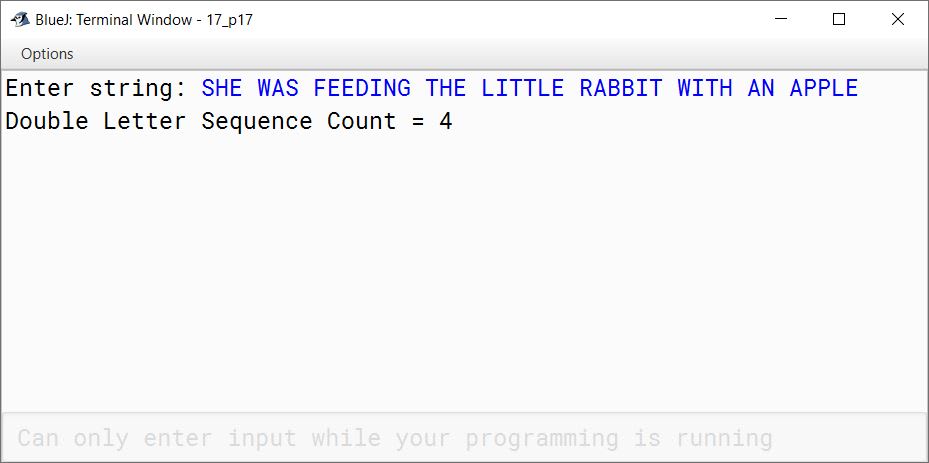
Sample Input : "SHE WAS FEEDING THE LITTLE RABBIT WITH AN APPLE"

Sample Output : 4

import java.util.Scanner;

public class KboatLetterSeq
{
    public static void main(String args[]) {
        Scanner in = new Scanner(System.in);
        System.out.print("Enter string: ");
        String s = in.nextLine();
        String str = s.toUpperCase();
        int count = 0;
        int len = str.length();
        
        for (int i = 0; i < len - 1; i++) {
            if (str.charAt(i) == str.charAt(i + 1))
                count++;
        }
        
        System.out.println("Double Letter Sequence Count = " + count);
        
    }
}
BlueJ output of KboatLetterSeq.java

Solution not available in the source paper.

17Assignment Questions

Design a class to overload a function check( ) as follows :

(i) void check(String str, char ch) - to find and print the frequency of a character in a string.
Example:
Input :
str = "success" ch= 's'

Output :
number of s present is = 3

(ii) void check (String s1) - to display only vowels from string s1, after converting it to lower case.
Example:
Input:
sl = "computer"
Output : o u e

public class KboatOverload
{
    void check (String str , char ch ) {
        int count = 0;
        int len = str.length();
        for (int i = 0; i < str.length(); i++) {
            char c = str.charAt(i);
            if (ch == c) {
                count++;
            }
        }
        System.out.println("Frequency of " + ch + " = " + count);
    }
    
    void check(String s1) {
        String s2 = s1.toLowerCase();
        int len = s2.length();
        System.out.println("Vowels:");
        for (int i = 0; i < len; i++) {
            char ch = s2.charAt(i);
            if (ch == 'a' ||
                ch == 'e' ||
                ch == 'i' ||
                ch == 'o' ||
                ch == 'u')
                System.out.print(ch + " ");
        }
    }
}
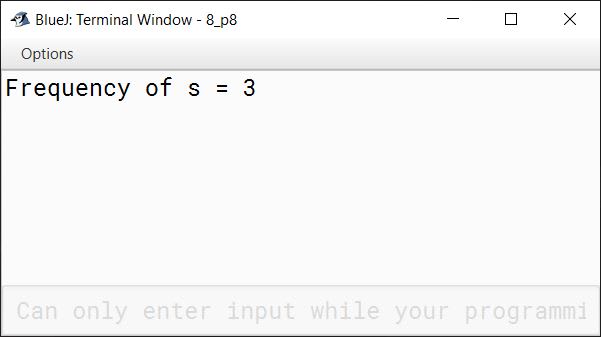
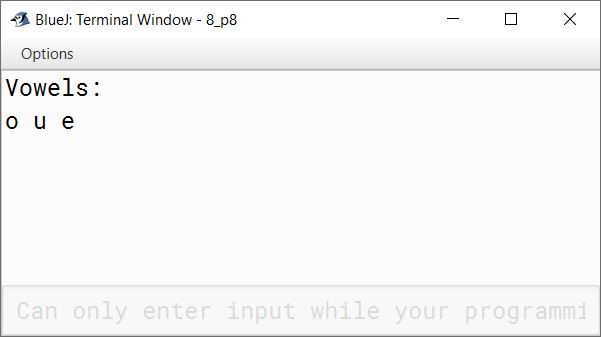
BlueJ output of KboatOverload.java BlueJ output of KboatOverload.java

Solution not available in the source paper.

Press ↓ to reveal a solution and move to the next question. Back to Sumita Arora Computer Applications.

Free sample bank