Question Paper2023

ICSE Class 10 Computer Applications — 2023 Paper

36 solved questions from Solved 2023 Question Paper ICSE Class 10 Computer Applications. Every answer follows the ICSE marking scheme.

Section
Marks
Insight
1(i)1 Mark · 2023 · Section A · 2023 PaperFull page

A mechanism where one class acquires the properties of another class:

Show SolutionHide Solution↓

Inheritance

Reason — Inheritance enables new classes to receive or inherit the properties and methods of existing classes.

1(ii)1 Mark · 2023 · Section A · 2023 PaperFull page

Identify the type of operator &&:

Show SolutionHide Solution↓

logical

Reason — Logical operators operate only on boolean operands and are used to construct complex decision-making expressions. Logical AND && operator evaluates to true only if both of its operands are true.

1(iii)1 Mark · 2023 · Section A · 2023 PaperFull page

The Scanner class method used to accept words with space:

Show SolutionHide Solution↓

nextLine()

Reason — nextLine() reads the input till the end of line so it can read a full sentence including spaces.

1(iv)1 Mark · 2023 · Section A · 2023 PaperFull page

The keyword used to call package in the program:

Show SolutionHide Solution↓

import

Reason — import keyword is used to import built-in and user-defined packages into our Java program.

1(v)1 Mark · 2023 · Section A · 2023 PaperFull page

What value will Math.sqrt(Math.ceil(15.3)) return?

Show SolutionHide Solution↓

4.0

Reason — Math.ceil method returns the smallest double value that is greater than or equal to the argument and Math.sqrt method returns the square root of its argument as a double value. Thus the given expression is evaluated as follows:

Math.sqrt(Math.ceil (15.3))
= Math.sqrt(16.0)
= 4.0

1(vi)1 Mark · 2023 · Section A · 2023 PaperFull page

The absence of which statement leads to fall through situation in switch case statement?

Show SolutionHide Solution↓

break

Reason — The absence of break statement leads to fall through situation in switch case statement.

1(vii)1 Mark · 2023 · Section A · 2023 PaperFull page

State the type of loop in the given program segment:

for (int i = 5; i != 0; i -= 2)
    System.out.println(i);
Show SolutionHide Solution↓

infinite

Reason — The given loop is an example of infinite loop as for each consecutive iteration of for loop, the value of i will be updates as follows:

IterationValue of iRemark
15Initial value of i = 5
23i = 5 - 2 = 3
31i = 3 - 2 = 1
4-1i = 1 - 2 = -1
5-3i = -1 - 2 = -3 and so on...

Since i will never be '0', the loop will execute infinitely.

1(viii)1 Mark · 2023 · Section A · 2023 PaperFull page

Write a method prototype name check() which takes an integer argument and returns a char:

Show SolutionHide Solution↓

char check (int x)

Reason — The prototype of a function is written in the given syntax:

return_type method_name(arguments)

Thus, the method has the prototype given below:

char check (int x)

1(ix)1 Mark · 2023 · Section A · 2023 PaperFull page

The number of values that a method can return is:

Show SolutionHide Solution↓

1

Reason — A method can return only one value.

1(x)1 Mark · 2023 · Section A · 2023 PaperFull page

Predict the output of the following code snippet:

String P = "20", Q ="22"; 
int a = Integer.parseInt(P);
int b = Integer.valueOf(Q);
System.out.println(a + " " + b);
Show SolutionHide Solution↓

20 22

Reason — The values of strings P and Q are converted into integers using the Integer.parseInt() method and stored in int variables a and b, respectively.
When the statement System.out.println(a + " " + b) is executed, first the operation a + " " is performed. Here, int variable a is converted to a string and a space is concatenated to it resulting in "20 ".
After this, the operation "20 " + b is performed resulting in 20 22 which is printed as the output.

1(xi)1 Mark · 2023 · Section A · 2023 PaperFull page

The String class method to join two strings is:

Show SolutionHide Solution↓

concat(String)

Reason — concat() method is used to join two strings. Its syntax is as follows:

String1.concat(String2)

1(xii)1 Mark · 2023 · Section A · 2023 PaperFull page

The output of the function "COMPOSITION".substring(3, 6):

Show SolutionHide Solution↓

POS

Reason — The substring() method returns a substring beginning from the startindex and extending to the character at endIndex - 1. Since a string index begins at 0, the character at index 3 is 'P' and the character at index 5 (6-1 = 5) is 'S'. Thus, "POS" is extracted.

1(xiii)1 Mark · 2023 · Section A · 2023 PaperFull page

int x = (int)32.8; is an example of ............... typecasting.

Show SolutionHide Solution↓

explicit

Reason — In explicit type conversion, the data gets converted to a type as specified by the programmer. Here, the float value 32.8 is being converted to int type by the programmer, explicitly.

1(xiv)1 Mark · 2023 · Section A · 2023 PaperFull page

The code obtained after compilation is known as:

Show SolutionHide Solution↓

java byte code

Reason — Java compiler converts Java source code into an intermediate binary code called Bytecode after compilation.

1(xv)1 Mark · 2023 · Section A · 2023 PaperFull page

Missing a semicolon in a statement is what type of error?

Show SolutionHide Solution↓

Syntax

Reason — Syntax Errors occur when we violate the rules of writing the statements of the programming language. Missing a semicolon in a statement is a syntax error.

1(xvi)1 Mark · 2023 · Section A · 2023 PaperFull page

Consider the following program segment and select the output of the same when n = 10 :

switch(n)
{
    case 10 : System.out.println(n*2); 
    case 4 : System.out.println(n*4); break; 
    default : System.out.println(n);
}
Show SolutionHide Solution↓
20
40

Reason — Since n = 10, case 10 will be executed. It prints 20 (10 * 2) on the screen. Since break statement is missing, the execution falls through to the next case. Case 4 prints 40 (10 * 4) on the screen. Now the control finds the break statement and the control comes out of the switch statement.

1(xvii)1 Mark · 2023 · Section A · 2023 PaperFull page

A method which does not modify the value of variables is termed as:

Show SolutionHide Solution↓

Pure method

Reason — A method which does not modify the value of variables is termed as a pure method.

1(xviii)1 Mark · 2023 · Section A · 2023 PaperFull page

When an object of a Wrapper class is converted to its corresponding primitive data type, it is called as ............... .

Show SolutionHide Solution↓

Unboxing

Reason — When an object of a Wrapper class is converted to its corresponding primitive data type, it is called as unboxing.

1(xix)1 Mark · 2023 · Section A · 2023 PaperFull page

The number of bits occupied by the value ‘a’ are:

Show SolutionHide Solution↓

16 bits

Reason — A char data type occupies 2 bytes in the memory.

1 byte = 8 bits
2 bytes = 8 * 2 = 16 bits

1(xx)1 Mark · 2023 · Section A · 2023 PaperFull page

Method which is a part of a class rather than an instance of the class is termed as:

Show SolutionHide Solution↓

Static method

Reason — Method which is a part of a class rather than an instance of the class is termed as Static method.

2(i)1 Mark · 2023 · Section A · 2023 PaperFull page

Write the Java expression for (a + b)x.

Show SolutionHide Solution↓
Math.pow(a + b, x)
2(ii)1 Mark · 2023 · Section A · 2023 PaperFull page

Evaluate the expression when the value of x = 4:

x *= --x + x++ + x

Show SolutionHide Solution↓

The given expression is evaluated as follows:

x *= --x + x++ + x (x = 4)
x *= 3 + x++ + x (x = 3)
x *= 3 + 3 + x (x = 4)
x *= 3 + 3 + 4 (x = 4)
x *= 10 (x = 4)
x = x * 10 (x = 4)
x = 4 * 10
x = 40

2(iii)1 Mark · 2023 · Section A · 2023 PaperFull page

Convert the following do…while loop to for loop:

int x = 10;
do
{
x––;
System.out.print(x);
}while (x>=1);	
Show SolutionHide Solution↓
for(int x = 9; x >= 0; x--)
{
    System.out.print(x);
}
2(iv)1 Mark · 2023 · Section A · 2023 PaperFull page

Give the output of the following Character class methods:

(a) Character.toUpperCase ('a')

(b) Character.isLetterOrDigit('#')

Show SolutionHide Solution↓

(a) Character.toUpperCase ('a')

A

In Java, the Character.toUpperCase(char ch) method is used to convert a given character to its uppercase equivalent, if one exists. So, the output is uppercase 'A'.

(b) Character.isLetterOrDigit('#')

false

Character.isLetterOrDigit() method returns true if the given character is a letter or digit, else returns false. Since, hash (#) is neither letter nor digit, the method returns false.

2(v)1 Mark · 2023 · Section A · 2023 PaperFull page

Rewrite the following code using the if-else statement:

int m = 400;
double ch = (m>300) ? (m / 10.0) * 2 : (m / 20.0) - 2;
Show SolutionHide Solution↓
int m = 400;
double ch = 0.0;
if(m > 300)
    ch = (m / 10.0) * 2;
else
    ch = (m / 20.0) - 2;
2(vi)1 Mark · 2023 · Section A · 2023 PaperFull page

Give the output of the following program segment:

int n = 4279; int d;
while(n > 0)
{ d = n % 10;
System.out.println(d); 
n = n / 100;
}
Show SolutionHide Solution↓
9
2

Step by step explanation of the code:

  1. int n = 4279; — Initializes the integer n with the value 4279.
  2. int d; — Declares an integer variable d without initializing it. It will be used to store the individual digits.

Now, let's go through the loop:

The while loop continues as long as n is greater than 0:

  • d = n % 10; — This line calculates the remainder when n is divided by 10 and stores it in d. In the first iteration, d will be 9 because the remainder of 4279 divided by 10 is 9.
  • System.out.println(d); — This line prints the value of d. In the first iteration, it will print 9.
  • n = n / 100; — This line performs integer division of n by 100. In the first iteration, n becomes 42. (Remember, it is integer division so only quotient is taken and fractional part is discarded.)

The loop continues, and in the second iteration:

  • d = n % 10; — d will now be 2 because the remainder of 42 divided by 10 is 2.
  • System.out.println(d); — It prints 2.
  • n = n / 100; — n becomes 0 because 42 divided by 100 is 0. Since n is no longer greater than 0, the loop terminates.
2(vii)1 Mark · 2023 · Section A · 2023 PaperFull page

Give the output of the following String class methods:

(a) "COMMENCEMENT".lastIndexOf('M')

(b) "devote".compareTo("DEVOTE")

Show SolutionHide Solution↓

(a) "COMMENCEMENT".lastIndexOf('M')

8
2(viii)1 Mark · 2023 · Section A · 2023 PaperFull page

Consider the given array and answer the questions given below:

int x[ ] = {4, 7, 9, 66, 72, 0, 16};

(a) What is the length of the array?

(b) What is the value in x[4]?

Show SolutionHide Solution↓

(a) 7

(b) 72

2(ix)1 Mark · 2023 · Section A · 2023 PaperFull page

Name the following:

(a) What is an instance of the class called?

(b) The method which has same name as that of the class name.

Show SolutionHide Solution↓

(a) Object.

(b) Constructor.

2(x)1 Mark · 2023 · Section A · 2023 PaperFull page

Write the value of n after execution:

char ch ='d';
int n = ch + 5;	
Show SolutionHide Solution↓

The value of n is 105.

3Written · 2023 · Section B · 2023 PaperFull page

Design a class with the following specifications:

Class name: Student

Member variables:
name — name of student
age — age of student
mks — marks obtained
stream — stream allocated

(Declare the variables using appropriate data types)

Member methods:
void accept() — Accept name, age and marks using methods of Scanner class.
void allocation() — Allocate the stream as per following criteria:

mksstream
>= 300Science and Computer
>= 200 and < 300Commerce and Computer
>= 75 and < 200Arts and Animation
< 75Try Again

void print() – Display student name, age, mks and stream allocated.

Call all the above methods in main method using an object.
Show SolutionHide Solution↓
import java.util.Scanner;

public class Student
{
    private String name;
    private int age;
    private double mks;
    private String stream;
    
    public void accept() 
    {
        Scanner in = new Scanner(System.in);
        System.out.print("Enter student name: ");
        name = in.nextLine();
        System.out.print("Enter age: ");
        age = in.nextInt();
        System.out.print("Enter marks: ");
        mks = in.nextDouble();
    }
    
    public void allocation() 
    {
        if (mks < 75)
            stream = "Try again";
        else if (mks < 200)
            stream = "Arts and Animation";
        else if (mks < 300)
            stream = "Commerce and Computer";
        else
            stream = "Science and Computer";
    }
    
    public void print() 
    {
        System.out.println("Name: " + name);
        System.out.println("Age: " + age);
        System.out.println("Marks: " + mks);
        System.out.println("Stream allocated: " + stream);
    }
    
    public static void main(String args[]) {
        Student obj = new Student();
        obj.accept();
        obj.allocation();
        obj.print();
    }
}
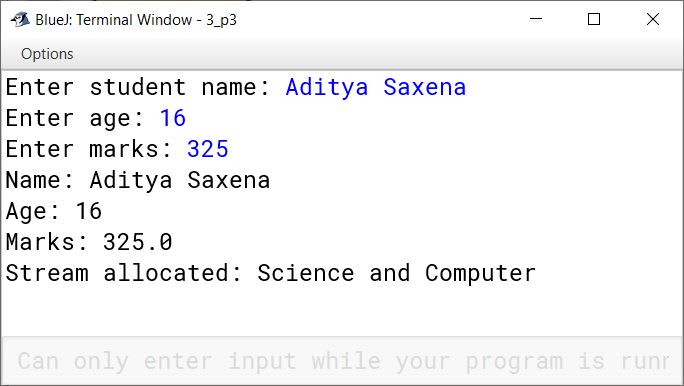
BlueJ output of Student.java
4Written · 2023 · Section B · 2023 PaperFull page

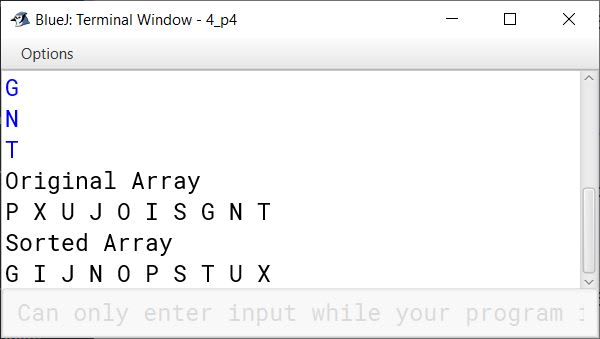
Define a class to accept 10 characters from a user. Using bubble sort technique arrange them in ascending order. Display the sorted array and original array.

Show SolutionHide Solution↓
import java.util.Scanner;

public class KboatCharBubbleSort
{
    public static void main(String args[]) 
    {
        Scanner in = new Scanner(System.in);
        char ch[] = new char[10];
        System.out.println("Enter 10 characters:");
        for (int i = 0;  i < ch.length; i++) {
            ch[i] = in.nextLine().charAt(0);
        }

        System.out.println("Original Array");
        for (int i = 0;  i < ch.length; i++) {
            System.out.print(ch[i] + " ");
        }
        
        //Bubble Sort
        for (int i = 0; i < ch.length - 1; i++) {
            for (int j = 0; j < ch.length - 1 - i; j++) {
                if (ch[j] > (ch[j + 1])) {
                    char t = ch[j];
                    ch[j] = ch[j + 1];
                    ch[j + 1] = t;
                }
            }
        }
        
        System.out.println("\nSorted Array");
        for (int i = 0;  i < ch.length; i++) {
            System.out.print(ch[i] + " ");
        }
    }
}
BlueJ output of KboatCharBubbleSort.java
5Written · 2023 · Section B · 2023 PaperFull page

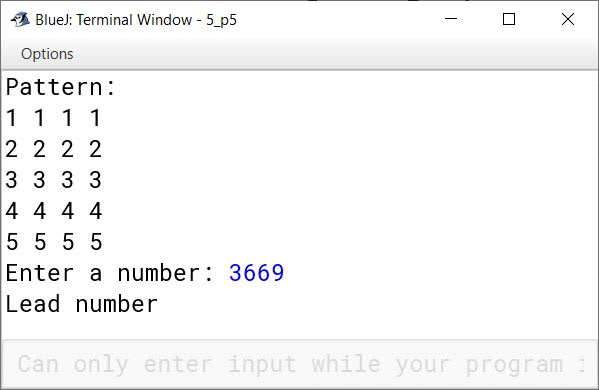
Define a class to overload the function print as follows:

void print() - to print the following format

Show SolutionHide Solution↓
1  1  1  1
2  2  2  2
3  3  3  3
4  4  4  4
5  5  5  5

void print(int n) - To check whether the number is a lead number. A lead number is the one whose sum of even digits are equal to sum of odd digits.

e.g. 3669
odd digits sum = 3 + 9 = 12
even digits sum = 6 + 6 = 12
3669 is a lead number.

import java.util.Scanner;

public class KboatMethodOverload
{
    public void print()
    {
        for(int i = 1; i <= 5; i++) 
        {
            for(int j = 1; j <= 4; j++)
            {
                System.out.print(i + " ");
            }
        System.out.println();
        }
    }
    
    public void print(int n)
    {
        int d = 0;
        int evenSum = 0;
        int oddSum = 0;
        while( n != 0)
        {
            d = n % 10;
            if (d % 2 == 0)
                    evenSum += d;
                else
                    oddSum += d;
            n = n / 10;
        }
        
        if(evenSum == oddSum)
            System.out.println("Lead number");
        else
            System.out.println("Not a lead number");
    }
    
    public static void main(String args[]) 
    {
        KboatMethodOverload obj = new KboatMethodOverload();
        Scanner in = new Scanner(System.in);
        
        System.out.println("Pattern: ");
        obj.print();
        
        System.out.print("Enter a number: ");
        int num = in.nextInt();
        obj.print(num);
    }
}
BlueJ output of KboatMethodOverload.java
6Written · 2023 · Section B · 2023 PaperFull page

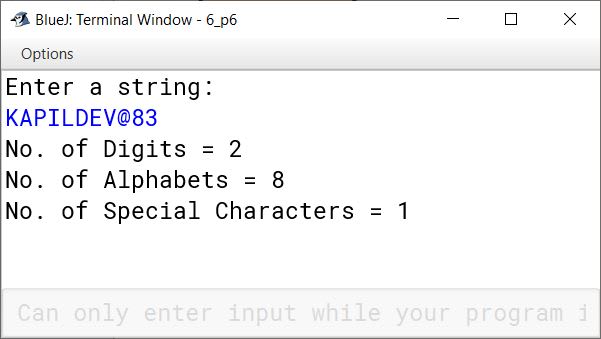
Define a class to accept a String and print the number of digits, alphabets and special characters in the string.

Example:
S = "KAPILDEV@83"
Output:
Number of digits – 2
Number of Alphabets – 8
Number of Special characters – 1

Show SolutionHide Solution↓
import java.util.Scanner;

public class KboatCount
{
   public static void main(String args[]) 
   {
        Scanner in = new Scanner(System.in);
        System.out.println("Enter a string:");
        String str = in.nextLine();
             
        int len = str.length();

        int ac = 0;
        int sc = 0;
        int dc = 0;
        char ch;

        for (int i = 0; i < len; i++) {
            ch = str.charAt(i);
            if (Character.isLetter(ch))  
                ac++;    
            else if (Character.isDigit(ch))
                dc++;
            else if (!Character.isWhitespace(ch))
                sc++;
        }
        
        System.out.println("No. of Digits = " + dc);
        System.out.println("No. of Alphabets = " + ac);
        System.out.println("No. of Special Characters = " + sc);
        
    }
}
BlueJ output of KboatCount.java
7Written · 2023 · Section B · 2023 PaperFull page

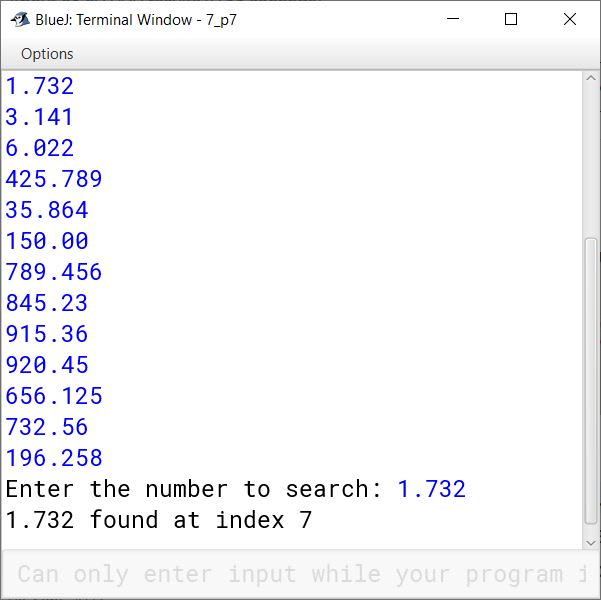
Define a class to accept values into an array of double data type of size 20. Accept a double value from user and search in the array using linear search method. If value is found display message "Found" with its position where it is present in the array. Otherwise display message "not found".

Show SolutionHide Solution↓
import java.util.Scanner;

public class KboatLinearSearch
{
    public static void main(String args[]) 
    {
        Scanner in = new Scanner(System.in);
        
        double arr[] = new double[20];
        int l = arr.length;
        int i = 0;
        
        System.out.println("Enter array elements: ");
        for (i = 0; i < l; i++) 
        {
            arr[i] = in.nextDouble();    
        }
        
        System.out.print("Enter the number to search: ");
        double n = in.nextDouble();
        
        for (i = 0; i < l; i++) 
        {
            if (arr[i] == n) 
            {
                break;
            }
        }
        
        if (i == l) 
        {
            System.out.println("Not found");
        }
        else 
        {
            System.out.println(n + " found at index " + i);
        }
    }
}
BlueJ output of KboatLinearSearch.java
8Written · 2023 · Section B · 2023 PaperFull page

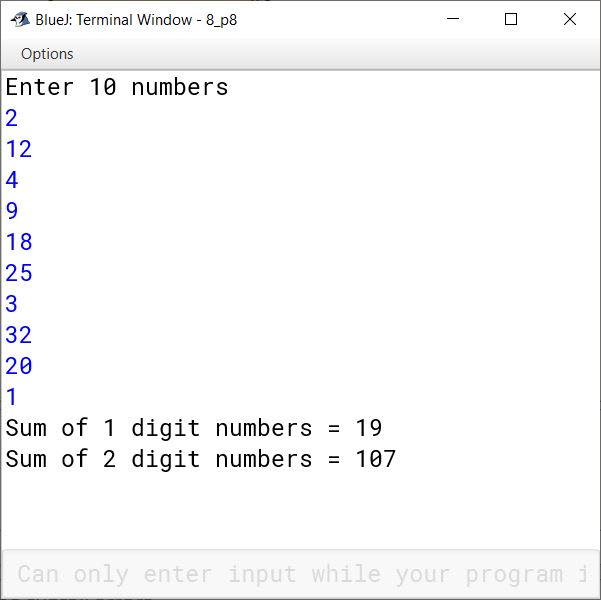
Define a class to accept values in integer array of size 10. Find sum of one digit number and sum of two digit numbers entered. Display them separately.

Example:
Input: a[ ] = {2, 12, 4, 9, 18, 25, 3, 32, 20, 1}
Output:
Sum of one digit numbers : 2 + 4 + 9 + 3 + 1 = 19
Sum of two digit numbers : 12 + 18 + 25 + 32 + 20 = 107

Show SolutionHide Solution↓
import java.util.Scanner;

public class KboatDigitSum
{
    public static void main(String args[]) 
    {
        Scanner in = new Scanner(System.in);
        int oneSum = 0, twoSum = 0, d = 0;
        int arr[] = new int[10];
        System.out.println("Enter 10 numbers");
        int l = arr.length;
        
        for (int i = 0; i < l; i++) 
        {
            arr[i] = in.nextInt();
        }
        
        for (int i = 0; i < l; i++) 
        {
            if(arr[i] >= 0 && arr[i] < 10 )
                oneSum += arr[i];
            else if(arr[i] >= 10 && arr[i] < 100 )
                twoSum += arr[i];
        }
        
        System.out.println("Sum of 1 digit numbers = "+ oneSum);
        System.out.println("Sum of 2 digit numbers = "+ twoSum);
        
    }
}
BlueJ output of KboatDigitSum.java

Press ↓ to reveal a solution and move to the next question. Browse the free sample bank.

All 357 Computer Applications questions